Sugo on iPhone Duo: a recipe app that opens like a cookbook
Sugo now supports iPhone Duo. Open it like a book and a recipe gets two pages: the ingredients on the left, the method beside them on the right.
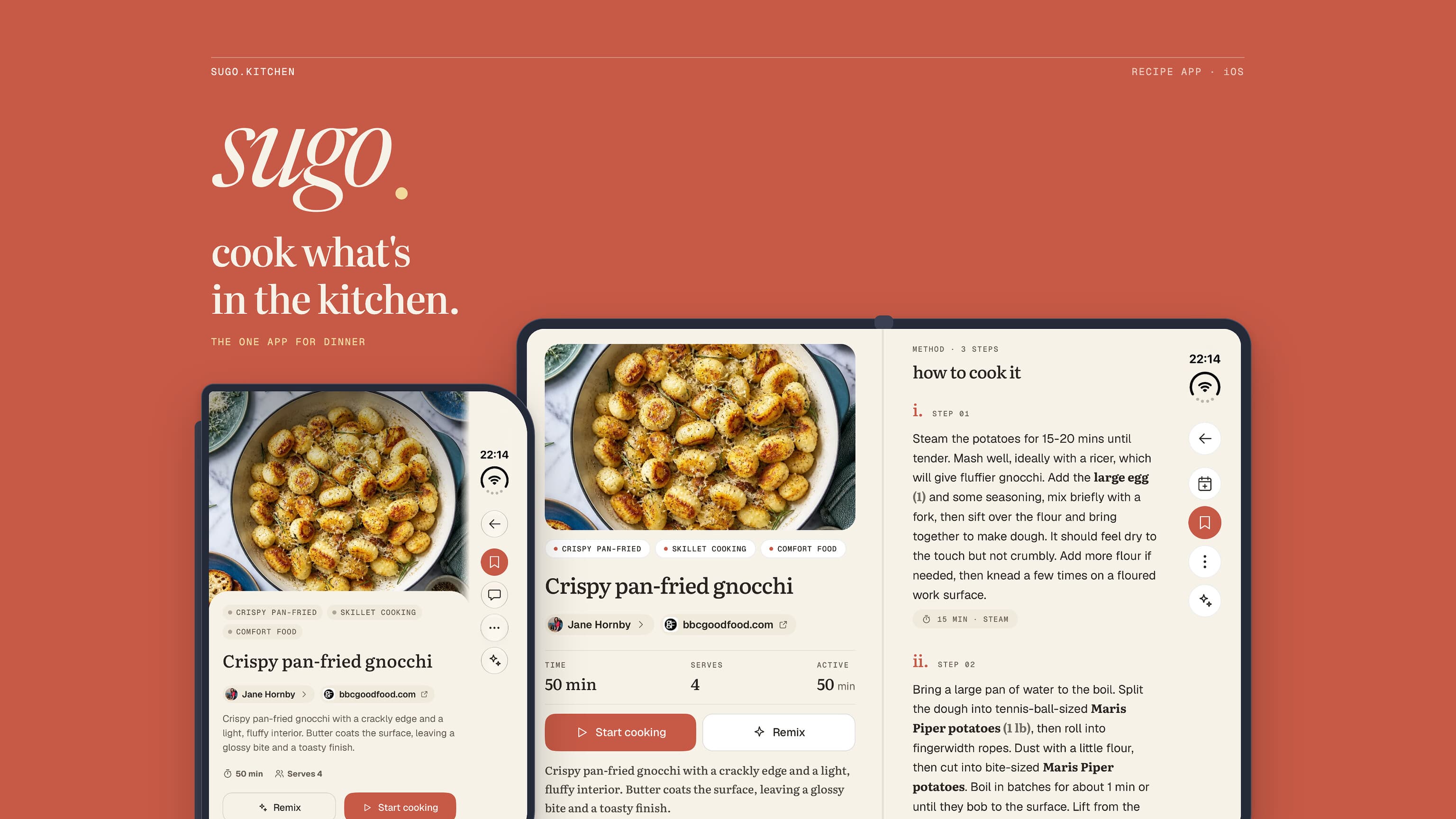
Sugo now runs properly on iPhone Duo, Apple's foldable iPhone. Closed, it is the phone app, with its buttons moved into the bar iOS keeps down the side of the outer display. Open it like a book and a recipe gets two pages: the photo, timings and ingredients on the left, the method on the right, each scrolling on its own. Stand it half-open on the counter and cook mode puts the step on the upright half and the controls on the flat half, where you can tap them without knocking the phone over.
It all arrives in version 1.1.4 of the iPhone app. There is nothing to switch on: update, unfold, and open a recipe.
A recipe was always two pages
Open almost any cookbook at a recipe and the ingredients sit in a column beside the method, or on the facing page. You read step three and your eye drops sideways to check how much butter, without losing your place in either.
A phone has one column, so the ingredients go on top and the method underneath. By the third step the list has scrolled off the top of the screen, and checking the butter means scrolling back up with a floury thumb and then finding your step again. Every recipe app on a phone has this problem, ours included. A wider screen does not fix it by itself: the iPad layout of most apps is still one long column, just with bigger margins.
The inner display of iPhone Duo is the first phone shape that can hold the two halves of a recipe at once, and that is what Sugo does with it.
One recipe, closed and then opened
Open like a book
Open: the recipe gets its second page
Hold the open Duo sideways and the recipe screen becomes a spread. The left page has the photo, the title, who wrote it, the time and the servings, the Start cooking button, and then the ingredient list with its servings stepper and the switch between cups and grams. The right page is the method. The two pages scroll separately, so you can be halfway down a long method with the whole ingredient list still in view. Nothing is printed on the fold itself: the hinge falls in the gutter between the pages, where a book would put its spine.
Every other screen is the phone's own, with more room around it. The destinations (Home, Discover, Plan, Shopping, Pantry, your library) move into a sidebar on the left, and each screen's buttons go into the bar down the right-hand edge, the same place Apple puts them in its own apps. The menu and the buttons stay where they are on every screen, so you are not hunting for search after you open a recipe.
Which way up you hold it changes the layout, and the two suit different moments.
Open, held upright
The phone's layout, tab bar along the bottom, with a bigger photo and the recipe read from top to bottom. Good for browsing and for reading a recipe through before you start.
Open, held sideways
Two pages, ingredients on the left and the method on the right. Good for cooking from, because neither half scrolls the other out of view.
Closed: a phone with its buttons on the side
The outer display of iPhone Duo is shorter and wider than an ordinary iPhone screen, so iOS moves an app's bars into a vertical strip on the right, under the clock and the Dynamic Island. Sugo puts its own controls in that strip: Back and the screen's buttons at the top, the five tabs at the bottom where your thumb is. The content gets the full height of the display, which on a screen this short is the difference between seeing a recipe's photo and its title, or only one of them.
Turn the closed Duo on its side and the strip moves with it to the left edge. When there is not enough height for everything, the tabs drop their labels and keep their icons, which is what a native tab bar does in the same squeeze.
Stood half-open on the counter
The Duo stands up on its own when it is half-open, like a small laptop, and that is how a lot of people will cook with it. Cook mode, Sugo's one-step-at-a-time screen, now has a layout for that pose. The step gets the whole upright half, set large enough to read from a pace away, and a long step is set a little smaller so all of it fits above the fold. The flat half is the base: the step's timers, what the next step will need, the voice button and back and next, all of it on the part of the phone a finger can press without tipping the screen backwards. Nothing sits on the fold.
Apple's own guidance for this pose is content on the upright half and controls on the base, and the cooking app in Apple's launch announcement, NYT Cooking, does something similar with its recipes. It is the right shape for a kitchen: the phone stays put on the counter, and you only reach for it to move on.
Elsewhere in the app
Nothing to relearn
Every screen on the open Duo is the phone's own, the same buttons, cards and lists, given more room. The side bar replaces the tab bar; nothing else moves.
Cook party
The dish you are all cooking fills the left page, and who is in the party, with the controls to start and end it, fills the right.
Lists and pantry
Fold or unfold the Duo while you are looking at your pantry and you are still on your pantry afterwards, on either display.
Alerts and sheets
When the Duo is half-open, a confirmation or a sheet opens whole on one side of the fold instead of across it.
What it does not do yet
Cook mode only has its own layout for the counter pose. Open flat or held like a book, it is the same full-screen step as on any phone, and it does not spread the step and the ingredients across two pages the way the recipe screen does. That is the obvious next thing.
The counter layout is cook mode's alone. Stand the Duo half-open anywhere else in the app and the screen keeps its ordinary layout, so a long page runs across the fold. Alerts and sheets are the exception.
Folding and unfolding keeps you on the same screen, but not always at the same point on it. A long list or a recipe you had scrolled through starts again from the top after the switch, because the two layouts are built separately.
And it needs version 1.1.4. Older versions still run on the Duo, but they were built before it existed: their buttons stay in the app's own top and bottom bars, and the strip beside the system bar is left empty.
In Sugo
The two-page layout is the recipe screen of your recipe library, and the counter layout belongs to cook mode. If cooking from a phone without touching it is the part you care about, how to cook from a recipe without touching your phone covers voice and the other hands-free controls, and how to save recipes so you actually cook them is the place to start a library worth opening on a bigger screen.
Sugo is free on iPhone, iPad and Mac, on Android, and in any browser at app.sugo.kitchen. If your new iPhone Duo is about to spend its evenings propped open on the worktop, download Sugo.